Web Banking Experience
Secure browser journeys and continuity across banking channels
A browser is a full banking channel
Web banking supports customers who prefer a browser and business users managing approvals, files or detailed records. It should provide clear status, accessible navigation and appropriate security across supported browsers and screen sizes. A wider screen does not automatically mean stronger identity or authority.
Design the actual tasks rather than copying every mobile screen into a larger frame. Business payments may need maker-checker roles, batch review and limits; retail customers may need simple statements and servicing. Those needs should come from the product and mandate, not a universal rule that every business uses dual approval.
Session and action security
Use appropriate secure session management, transport protection and server-side authorisation. Protect consequential requests from relevant injection, cross-site scripting and cross-site request forgery threats. UI controls alone cannot establish account authority.
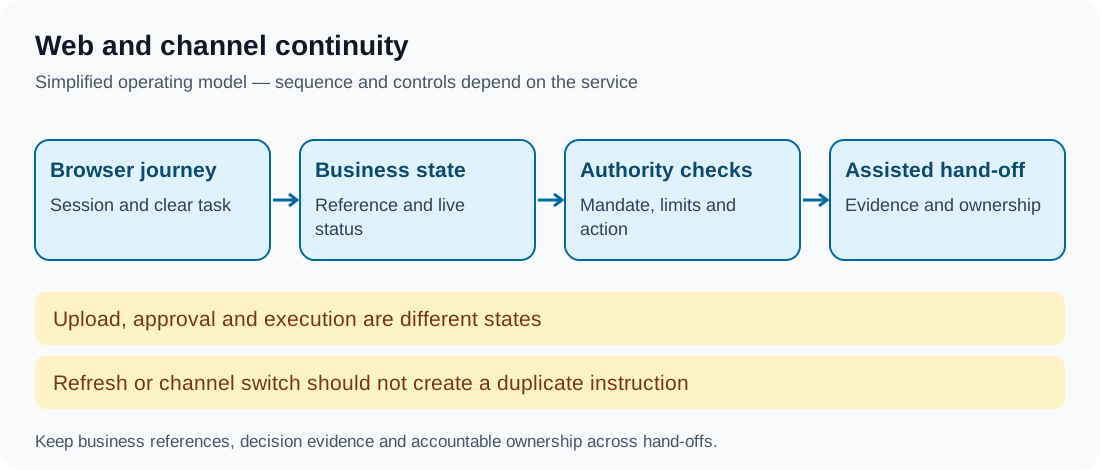
Handle session expiry with truthful status and safe reauthentication. Preserve a draft only under the applicable privacy and retention policy, especially on shared devices. Browser back, refresh and multiple tabs must not accidentally replay money movement or replace newer account state with stale data.
Documents, files and approvals
Distinguish uploading a payment file, validating it, authorising instructions and executing them. Show file and item-level errors, duplicate handling and relevant references. A successful upload receipt does not establish that every beneficiary received funds.
Make approval details inspectable before action. Check current mandate and limits at the effect boundary, not only when the user first opened the page. Control downloadable statements and reports so a link does not bypass access restrictions. Do not place sensitive information unnecessarily in URLs, browser history or third-party telemetry.
Continue across channels without copying authority
Customers may start on mobile, continue in a browser and then seek assisted service. Join the relevant application, transaction or case using business identifiers. Carry context and history while checking identity, authority and freshness appropriate to each channel.
Switching channels should not create another payment or restart a case's age. An agent viewing a draft does not automatically have permission to execute it. Customer confirmations and channel-specific controls should reflect the actual arrangement.
Worked example: a batch and a changed mandate
In this fictional business bank, a user uploads a batch in the browser and another user begins approval. Before commitment, the approver's mandate is revoked. The service checks current authority and prevents the incompatible effect instead of relying solely on the permission snapshot from page load.
The batch retains its reference and status for an appropriately authorised user to resolve. Support can see the reason and history without telling the business to upload an identical file again. The outcome is controlled continuity, not identical access for every channel and person.
Accessibility and operating assurance
Test keyboard operation, focus, zoom, labels, errors and assistive technology using relevant WCAG 2.2 criteria. Support responsive layouts for the actual browser population. An accessible main dashboard is insufficient if the payment confirmation or PDF statement cannot be used.
Monitor session errors, abandoned approvals, duplicate files, failed downloads and support transfers. Test refresh after commitment, parallel tabs, lost responses, role changes, browser upgrades and a return from an assisted case. Reconcile channel representations to the business record.
Takeaway
Web banking needs clear task semantics, safe sessions and server-enforced authority. Channel continuity preserves the customer's business event and evidence while applying the controls appropriate to each user and action.
Continue to Conversational Banking.