Mobile Banking Experience
Navigation, servicing, notifications and customer self service
Design for the tasks people need
A mobile banking experience lets customers understand and manage their financial service on a small screen. Start with research into actual tasks: checking money, making payments, managing cards, finding documents or seeking help. The required navigation depends on the customers and product; there is no universal two-tap rule or fixed home-screen order.
Make important tasks discoverable and accessible. Give balances and transaction states precise labels. Available funds, posted balance and pending activity can differ. Explain which figure the customer can act on rather than choosing the largest number as the most attractive display.
A journey survives real devices
Test supported screen sizes, operating systems, assistive technologies and weak networks. Provide readable text, clear labels, usable controls and understandable errors. Avoid requiring precision gestures or colour alone to perform essential tasks.
App updates, device changes and operating-system permissions can affect service. Explain unsupported configurations and provide appropriate alternatives. Low battery, lost connectivity or a backgrounded app should not convert an uncertain payment into an automatic duplicate submission.
Money movement and self service
Show payee, amount, charges and other required details at the relevant points. Distinguish a quote, a draft, an authorised instruction and an executed effect. Use a durable reference to connect the customer's screen with the actual transaction.
Card lock, limit changes or disputes need real backend enforcement and clear scope. A temporary card lock may not block every transaction type under the issuer's implementation. Explain supported effects and alternatives rather than promising that a UI toggle freezes all possible activity instantly.
Notifications that tell the truth
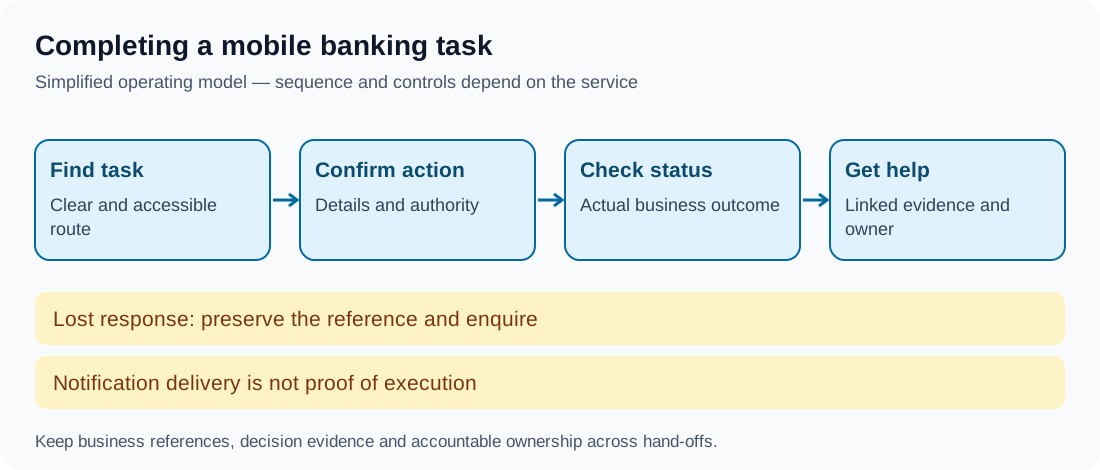
Notification delivery is not guaranteed and should not be the sole evidence of execution or customer acknowledgement. Reconcile alerts with authoritative status, handle delayed or duplicate notifications and limit sensitive detail on locked screens.
Deep links can reopen the intended task after authentication, but should validate the destination and authority. Never put secret credentials or unrestricted action authority in a push link. A customer tapping a message should not unknowingly authorise a payment.
Worked example: lost response after submission
In this fictional app, a customer submits a transfer before connectivity drops. The app preserves the instruction reference and displays an unconfirmed state. On reconnection it checks the original outcome instead of encouraging another transfer with a new reference.
The customer can inspect status and open help with the transaction attached. If a delayed success alert arrives after a subsequent return, the app shows the current state and history rather than treating the old alert as the latest truth. Operations owns unresolved cases.
Privacy, trust and support
Minimise information in analytics, crash logs, screenshots and third-party tools. Ask for device permissions in context and explain the purpose. Access to contacts or location should not be assumed necessary for every banking task.
Provide accessible assistance and a controlled recovery route for a lost device. A helper is not automatically an authorised operator. Customer support should receive relevant task context without receiving secrets or unnecessary personal information.
Measure useful outcomes
Monitor task completion, time distribution, errors, repeated instructions, support contacts and accessibility barriers. Compare app states to business records. Ratings, engagement and downloads can inform research but cannot prove that payments, freezes or cancellations work correctly.
WCAG 2.2 supplies web-accessibility criteria relevant to web-based experiences; native apps also need platform and applicable legal assessment. Compliance depends on the actual implementation, not simply declaring the product mobile friendly.
Takeaway
A good mobile experience makes important tasks understandable, controlled and recoverable. The screen, notification and support case should describe the same financial event at the appropriate point in its lifecycle.
Continue to Web Banking Experience.